
Cash on Delivery provides your customers with a cash on delivery payment option when purchasing from your store. No payment gateway or merchant accounts are required for this offline method. When customers place their order, they will be shown instructions on how the payment will be collected.
Log on to CRM and follow the below given steps.
- Go to Settings > Payment > COD setting.
- Click Add CoD Rate and enter following details:
- Title: name to identify the COD rate
- Country: countries where you want to offer cash on delivery payment option
- Amount type: Fixed or Percentage. Depending on option you choose enter percentage or rate
- Price From and Price to: You can set a range of order prices that will allow cash on delivery payments. This price range is the calculated subtotal, before shipping and taxes. If an order is not within the specified price range, and your customer has specified cash on delivery as the payment method, your customer will get an error when trying to complete the order.
- Zipcodes: area in which you want to offer cash on delivery payment option
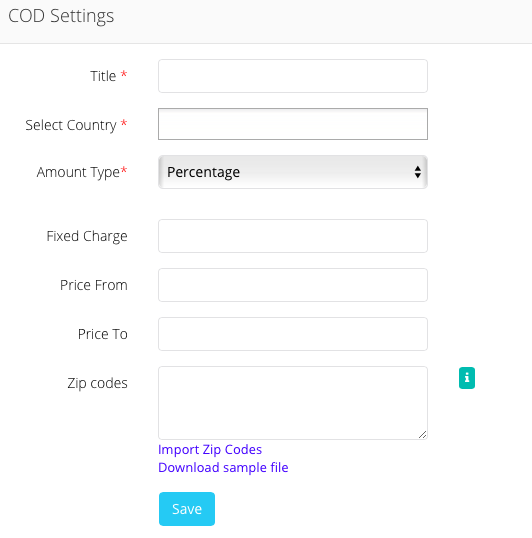
- Click Save.
Comments
0 comments
Please sign in to leave a comment.