
CCAvenue allows to accept and validate Internet payments via Credit Card, Debit Card, Net banking, ATM-cum-Debit Card, Digital and Mobile Wallets, Mobile Payment and Cash Card modes from the end customers in real-time. Before you can collect payments for orders made with CCAvenue, you'll need to set up and register your account with CCAvenue.
Integrating CCAvenue as payment gateway for your app is two step process: 1. Obtain CCAvenue account details 2. Add CCAvenue details in your app.
Obtain CCAvenue account details
- Login to your CCAvenue MCPG account and go to Setting > API key
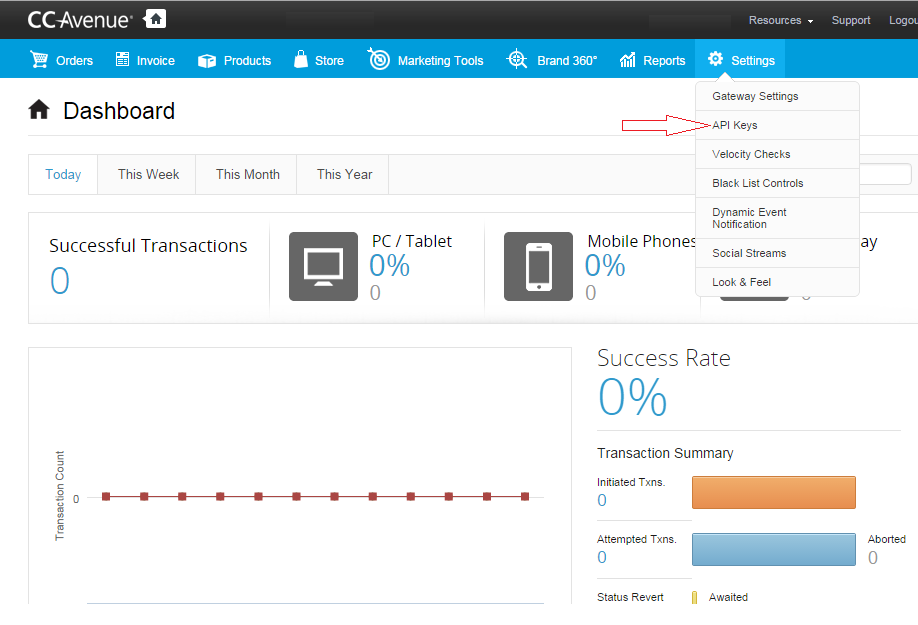
- Note down Merchant ID, Access Code and Encryption Key.

Add CCAvenue details in your app
Login to CRM. Go to Settings > Payments > Payment Gateway and follow the below given steps:
- Click Setting icon against CCAvenue.

- Specify Merchant ID, Access Code and Encryption Key (Working key) of CCAvenue account and click Save.
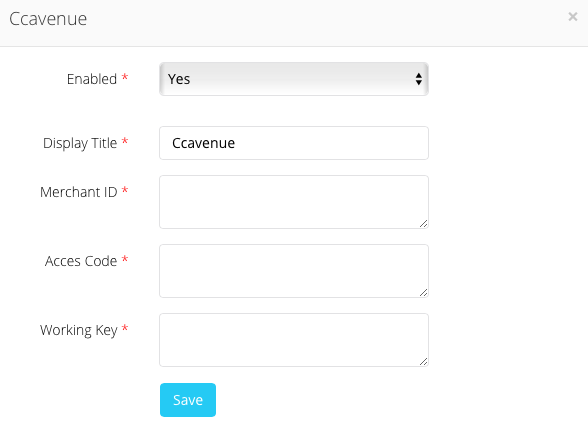
This will integrate your CCAvenue account in your mobile app to accept payments through CCAvenue payment gateway.
Comments
0 comments
Please sign in to leave a comment.